A practical hot desking hygiene policy template should set clear rules for booking desks, cleaning shared workspaces and equipment, and leaving each workstation ready for the next person. UK employers with five or more employees must write down their health and safety policy, according to the UK Government. Hot desking means staff use available desks rather than having one permanently assigned to them.
Sharing a workspace runs more smoothly when everyone knows what to do before, during and after using a desk. Without consistent expectations, booking confusion and unclear cleaning responsibilities can make shared areas harder to manage.
This guide explains how to set desk-booking arrangements, establish a practical end-of-day reset and define considerate etiquette for shared offices. It also covers supplies and workplace routines that help staff leave desks clean, tidy and ready for the next user.
Key Takeaways
- Set out whether desks are booked ahead, allocated on a first-come, first-served basis, or managed through a combination of both.
- Make cleaning supplies visible and available, and clarify how staff should clean shared desks and equipment between uses.
- Build an end-of-day reset into the policy so personal belongings are removed and workspaces are left tidy for colleagues.
- Define considerate shared-space behaviour, including how to handle noise, desk conflicts and equipment issues.
Why do you need a hot desk policy?
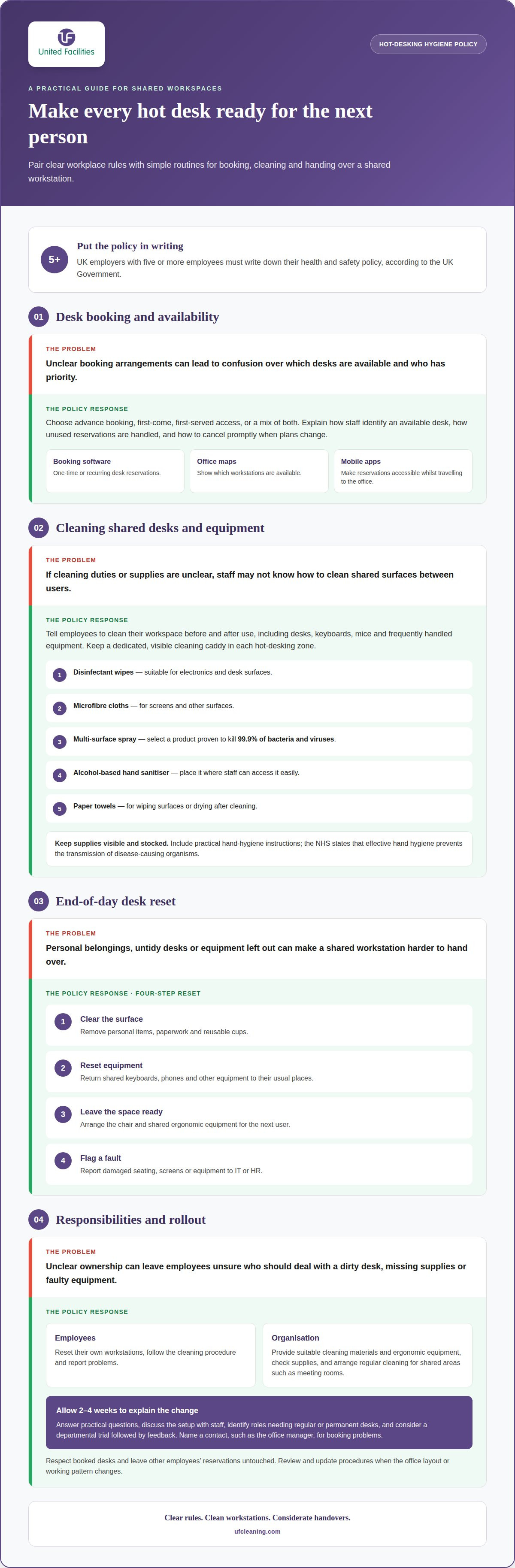
A hot desking hygiene policy template gives staff clear instructions for cleaning shared workspaces and equipment between users. UK employers with five or more employees must write down their health and safety policy, according to the UK Government. The policy should assign responsibility for cleaning desks, checking supplies and reporting problems.
Are there UK HSE or NHS guidelines for shared workplace hygiene? The NHS states that effective hand hygiene prevents the transmission of disease-causing organisms. Include practical instructions for hand hygiene and shared surfaces, and explain the cleaning routine for each hot desk user.
What should a hot desking hygiene policy template include? Set out daily cleaning, between-user resets, suitable products, supply checks and each employee’s responsibilities. Display the instructions beside shared desks so staff can follow the same steps before using equipment and when they finish.
Provide a dedicated cleaning caddy in each hot-desking zone, with tools suited to different surfaces:
- Disinfectant wipes: choose products suitable for electronics and desk surfaces.
- Microfibre cloths: use them on screens and other surfaces.
- Multi-surface spray: select a product proven to kill 99.9% of bacteria and viruses.
- Alcohol-based hand sanitiser: place it where staff can access it easily.
- Paper towels: provide them for wiping surfaces or drying after cleaning.
For daily cleaning, specify which shared areas need attention, including desks, keyboards, mice and frequently handled equipment. Employees should clean their workspace before and after use with products suitable for each item. Keep supplies visible and stocked so a missing wipe or empty sanitiser bottle does not interrupt the routine. At the end of each workday, staff should remove personal items and leave the desk clean and tidy. These steps make responsibilities clear across assigned and unassigned workstations.
Desk booking and first-come, first-served arrangements
UK organisations can adapt a hot desk policy template to their booking process, office layout and staff needs. Explain who can reserve desks, how priority is decided and what employees should do when plans change.
Choose one clear allocation method. Advance booking gives employees a confirmed workstation, while first-come, first-served access lets staff choose an available desk on arrival. A mixed arrangement can reserve some desks for bookings and leave others open. State the approach in the policy, including how employees identify an available desk and what happens if a reservation goes unused.
Booking technology can make flexible arrangements easier to follow:
- Desk-booking software lets team members reserve a desk for one-time use or set up recurring bookings.
- Real-time office maps show which workstations are available, helping colleagues find a suitable space easily.
- Workplace mobile apps can make reservations accessible whilst staff are travelling to the office.
Include a cancellation step. If someone’s plans change and they will not attend, they should cancel promptly so another colleague can use the desk. Explain how staff request recurring bookings and whether they can choose a particular zone. If personal items need storage, identify lockers and explain how to use them without leaving belongings at shared desks.
Communicate the arrangements before you implement them. Allow 2-4 weeks to explain the change to employees, answer practical questions and clarify how bookings support collaboration between team members. Discuss the proposed setup with staff, identify roles needing regular or permanent desks, and consider a departmental trial followed by feedback. Include a named contact, such as the office manager, for booking problems or recurring availability concerns. Review the policy with employees and update procedures when the office layout or working pattern changes. Clear etiquette, such as respecting booked desks and leaving others’ reservations untouched, helps prevent avoidable disputes.
Employee end-of-day desk reset responsibilities
A clear end-of-day reset keeps shared office space ready for the next employee. Staff should remove personal items, leave the desk tidy and prepare shared equipment for handover. For hybrid teams, consistent expectations matter because colleagues may use the same workstation on different days.
What rules should employees follow when using shared desks, keyboards and phones? Employees should leave desks and equipment clean, remove belongings and report problems rather than leaving them for the next user. They should also follow the workplace cleaning procedure before handing over a workstation.
A short reset checklist makes these steps easier to remember:
- Clear the surface: remove personal items, paperwork and reusable cups from the desk.
- Reset equipment: return shared keyboards, phones and other equipment to their usual places.
- Leave the space ready: arrange the chair and any shared ergonomic equipment for the next user.
- Flag a fault: report damaged seating, screens or equipment to IT or HR.
Employers should clarify responsibilities, provide suitable cleaning materials and ergonomic equipment, and explain which tasks belong to employees. Staff can then reset their own workstations, while the organisation arranges regular cleaning for shared areas, including meeting rooms. This division helps prevent confusion over who should deal with a dirty desk or faulty chair.
Consult employees before introducing hot desking and involve them in making the arrangement work. Identify roles or departments that need regular or permanent desks, then invite feedback on the setup. For example, employees can raise concerns about desk availability, seating or equipment with their line manager or office manager. Review the policy and adjust it when feedback reveals recurring problems. Encourage staff to take breaks to avoid discomfort from sitting for too long and support a more comfortable working day.
How should employers handle illness, contamination and reported hygiene concerns? Employees who have been unwell should thoroughly clean the workspace they used. Staff should report desk or seating problems to IT or HR so concerns can be addressed through the workplace process.
Hot desking etiquette policies
Good etiquette makes flexible working more efficient by setting expectations for shared spaces. A policy should explain how colleagues respect one another’s work, use meeting areas and keep communal zones available. The practical rule is simple: leave each space ready for its next purpose and user.
Noise needs clear boundaries. Designate quiet zones for focused work and ask employees to hold conversations or calls in suitable meeting rooms. A sign at each zone entrance can show whether discussion is appropriate. For example, someone taking a call can move from a quiet area to a meeting space, reducing disruption without interrupting their work.
Set out everyday expectations in plain language:
- Respect shared desks: use the booked or available space, and avoid occupying neighbouring desks with personal belongings.
- Keep communal areas orderly: use clearly labelled waste and recycling bins for relevant items.
- Leave equipment available: return shared items to their usual place after use.
- Adjust the space considerately: set chairs and equipment back appropriately when leaving.
Meeting rooms also need agreed etiquette. Employees should follow the booking process, finish on time and leave the room ready for the next group. A shared calendar makes room availability visible, while clear signs can remind users of local expectations. These steps help prevent rooms becoming unavailable because of unrecorded meetings or belongings left behind.
Handle desk-space conflicts respectfully. Encourage colleagues to resolve misunderstandings directly and calmly; if the concern remains unresolved, they can raise it with a manager or HR. The policy should identify this route so staff know where to take recurring disputes. Ask employees to report patterns, such as repeated noise in a quiet zone, through the same channels. Review feedback and adjust the guidelines when flexible working arrangements or office spaces change.
For a consistently clean shared workplace, plan professional cleaning support alongside clear etiquette expectations.
UF Cleaning
UF Cleaning helps organisations maintain clean shared workspaces alongside clear employee reset routines. Its office cleaning service can support areas used by staff, including hot-desking environments where workstations are shared throughout the day.
Professional cleaning complements, rather than replaces, the policy: employees still follow booking, hygiene and desk-reset expectations, while scheduled cleaning supports the wider workplace. UF Cleaning provides office cleaning tailored to your premises and working arrangements.
To discuss office cleaning for your workplace, contact UF Cleaning.
Make your shared workplace easier to sustain
Once arrangements are in place, make the policy part of the workplace introduction for new starters. A practical hot desking hygiene policy template gives managers and employees a shared reference as teams, routines and office use change. Assign someone to keep the document current, and make the latest version easy for staff to find.
Cleaning arrangements can support expectations across the wider premises. UF Cleaning provides Housekeeping and Hotel Management alongside commercial cleaning services, helping organisations address cleaning as part of their broader facilities needs.
For a tailored discussion about maintaining your workplace, contact UF Cleaning for support. A considered policy, supported by suitable cleaning arrangements, gives your team a clear foundation for shared working.
Frequently Asked Questions
What is hot desking?
Hot desking is a way of organising office space where employees use available workstations instead of having permanently assigned desks. For example, a colleague might sit near their project team on one office day, then choose another available desk on a different day. The arrangement can support flexible attendance, provided staff understand how to find a workspace and prepare it for shared use.
What are the best practices for managing hot desks?
Set consistent rules for access, cleanliness, equipment and shared-space behaviour, then make them easy for employees to find. For instance, a floor plan can identify quiet zones, meeting rooms and desks with specialist equipment. Provide a clear route for reporting a faulty chair or unavailable workstation, and invite staff feedback when the layout or working pattern changes.
How often should shared desks and equipment be cleaned?
Clean shared desks between users and establish a routine for regular cleaning of desks and commonly handled equipment. A keyboard or telephone used by several people may need attention during the between-user reset, while broader office cleaning follows the workplace schedule. Increased use, visible soiling or reported concerns can prompt additional cleaning rather than waiting for the next routine visit.
Who is responsible for cleaning hot desks between users?
Employees should clean their workstation when they arrive and before handing it over. Employers should establish the cleaning routine and make suitable supplies available. For example, an employee can wipe a shared keyboard after use, then report a damaged device or empty supply point. Clear roles prevent staff from assuming that a colleague or cleaning team will handle every task.
What hand hygiene and cleaning products should a hot desking policy specify?
Specify hand sanitiser, wipes suitable for desks and electronics, and cloths for screens and other surfaces. Direct staff to use each product only on compatible materials and follow its label instructions. For example, a wipe intended for desk surfaces may not be suitable for a monitor, so clarify product use at the supply point.
What should a hot desking desk-cleaning checklist include?
A checklist should prompt users to clean the desk and shared equipment, clear personal belongings, return items to their usual places, and report faults or missing supplies. Include a simple way to record issues, such as a facilities reporting channel, so recurring problems are visible. Keep the checklist near workstations so employees can follow it during handover.